
时间: 2016/11/13 17:06:21
1、说明
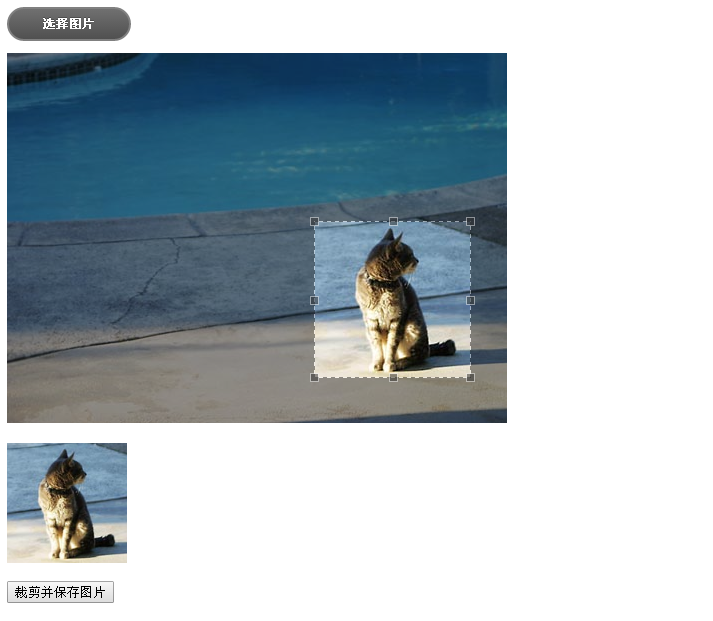
接上一篇文章uploadify实现多附件上传完成后,又突然用到头像上传并在线裁剪。在网上找个众多例子都没有符合要求的,有一篇文章写的不错,就是文旺老兄写的这篇Asp.Net平台下的图片在线裁剪功能的实现,大家可以看一下,写的真不错。我就是在参考了他的代码下,结合uploadify使用一般处理程序实现了这个功能,写下了这篇在asp.net实现图片在线上传并在线裁剪,有点绕口哈,废话不多说,现奉上代码,供同学们交流参考,有什么不对的地方,望请大家多多提提建议,多谢!多谢!
2、组成
首先说明一下代码实现所用到的技术,仅供参考:
开发工具:vs2010
目标框架:.NET Framework3.5
jcrop:Jcrop.js v0.9.12
Uploadify:uploadify-v3.1
Jquery:jquery-1.9.0.js
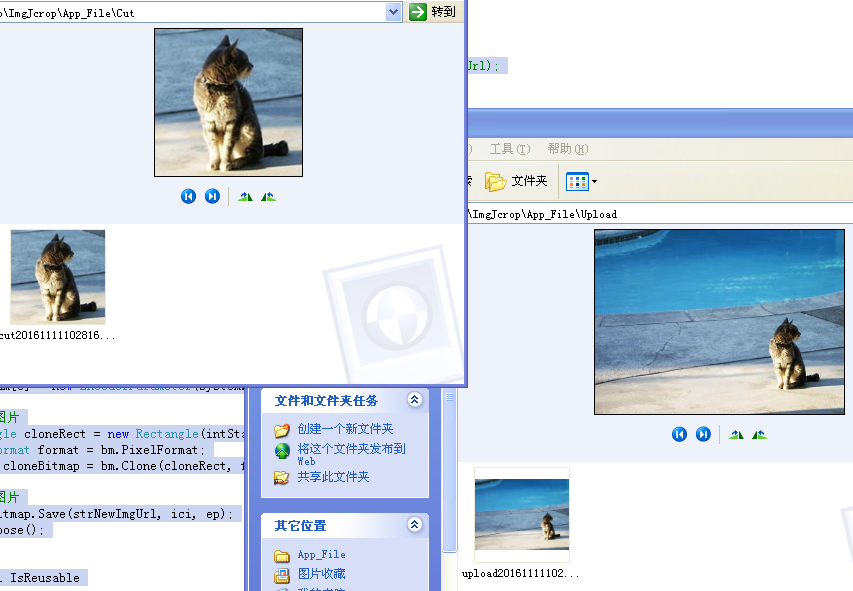
最后我会将整个Demo上传,如果同学们的电脑上有开发环境可直接打开项目解决方案运行。
3、代码
Default.aspx(测试页面)
<%@ Page Language="C#" AutoEventWireup="true" CodeBehind="Default.aspx.cs" Inherits="ImgJcrop._Default" %>
在线裁剪

Uploadify.ashx(一般处理程序)
<%@ WebHandler Language="C#" Class="UploadifyUpload" %>

using System;
using System.Collections;
using System.Data;
using System.Web;
using System.Linq;
using System.Web.Services;
using System.Web.Services.Protocols;
using System.Web.SessionState;
using System.IO;
using System.Collections.Generic;
using System.Web.UI.WebControls;
using System.Text;
using System.Drawing;
using System.Drawing.Imaging;

public class UploadifyUpload : IHttpHandler, IRequiresSessionState
{

    public void ProcessRequest(HttpContext context)
    {
        context.Response.ContentType = "text/plain";
        context.Response.Charset = "utf-8";

        string action = context.Request["action"];
        switch (action)
        {
            case "upload":
                //上传图片
                upload(context);
                break;
            case "cutsaveimg":
                //裁剪并保存
                cutsaveimg(context);
                break;
        }
        context.Response.End();
    }

    ///
    /// 上传图片
    ///
    ///
    private void upload(HttpContext context)
    {
        HttpPostedFile postedFile = context.Request.Files["Filedata"];
        if (postedFile != null)
        {
            string fileName, fileExtension;
            int fileSize;
            fileName = postedFile.FileName;
            fileSize = postedFile.ContentLength;
            if (fileName != "")
            {

                fileExtension = postedFile.FileName.Substring(postedFile.FileName.LastIndexOf(''.''));
                string strPath = context.Server.MapPath("/") + "\\App_File\\Upload\\";//设置文件的路径
                string strFileName = "upload" + DateTime.Now.ToString("yyyyMMddHHmmss") + fileExtension;
                string strFileUrl = strPath + strFileName;//保存文件路径
                if (!Directory.Exists(strPath))
                {
                    Directory.CreateDirectory(strPath);
                }
                postedFile.SaveAs(strFileUrl);//先保存源文件

                context.Response.Write("{\"status\":0,\"message\":\"/App_File/Upload/" + strFileName + "\"}");
            }
            else
            {
                context.Response.Write("{\"status\":1,\"message\":\"上传失败!\"}");
            }
        }
        else
        {
            context.Response.Write("{\"status\":1,\"message\":\"上传失败!\"}");
        }
    }

    ///
    /// 裁剪并保存图片
    ///
    ///
    private void cutsaveimg(HttpContext context)
    {
        string strImgUrl = context.Request["strImgUrl"];
        string strXone = context.Request["hidXone"];
        string strYone = context.Request["hidYone"];
        string strImgWidth = context.Request["hidImgWidth"];
        string strImgHeight = context.Request["hidImgHeight"];

        string[] urls = strImgUrl.Split(''/'');
        string str_url = urls.Last();

        try
        {
            string strOldFiel = context.Server.MapPath("~/App_File/Upload/");
            string strNewFiel = context.Server.MapPath("~/App_File/Cut/");
            string strOldUrl = Path.Combine(strOldFiel, str_url);
            string strNewUrl = Path.Combine(strNewFiel, "cut" + DateTime.Now.ToString("yyyyMMddHHmmss") + "." + str_url.Split(''.'')[1]);
            if (!Directory.Exists(strNewFiel))
            {
                Directory.CreateDirectory(strNewFiel);
            }
            int intStartX = int.Parse(strXone);
            int intStartY = int.Parse(strYone);
            int intWidth = int.Parse(strImgWidth);
            int intHeight = int.Parse(strImgHeight);
            CutGeneratedImage(intStartX, intStartY, intWidth, intHeight, strOldUrl, strNewUrl);
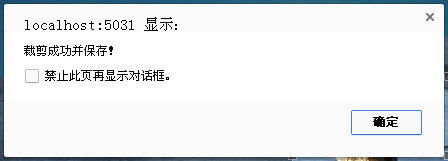
            context.Response.Write("{\"status\":0,\"message\":\"裁剪成功并保存!\"}");
        }
        catch
        {
            context.Response.Write("{\"status\":1,\"message\":\"裁剪失败!\"}");
        }
    }
    ///
    /// 裁剪图片
    ///
    /// 要缩小裁剪图片宽度
    /// 要缩小裁剪图片长度
    /// 要处理图片路径
    /// 处理完毕图片路径
    public void CutGeneratedImage(int intStartX, int intStartY, int intWidth, int intHeight, string strOldImgUrl, string strNewImgUrl)
    {
        //上传标准图大小
        int intStandardWidth = 120;
        int intStandardHeight = 120;

        int intReduceWidth = 0; // 缩小的宽度
        int intReduceHeight = 0; // 缩小的高度
        int intCutOutWidth = 0; // 裁剪的宽度
        int intCutOutHeight = 0; // 裁剪的高度
        int level = 100; //缩略图的质量 1-100的范围

        //获得缩小,裁剪大小
        if (intStandardHeight * intWidth / intStandardWidth > intHeight)
        {
            intReduceWidth = intWidth;
            intReduceHeight = intStandardHeight * intWidth / intStandardWidth;
            intCutOutWidth = intWidth;
            intCutOutHeight = intHeight;
        }
        else if (intStandardHeight * intWidth / intStandardWidth < intHeight)
        {
            intReduceWidth = intStandardWidth * intHeight / intStandardHeight;
            intReduceHeight = intHeight;
            intCutOutWidth = intWidth;
            intCutOutHeight = intHeight;
        }
        else
        {
            intReduceWidth = intWidth;
            intReduceHeight = intHeight;
            intCutOutWidth = intWidth;
            intCutOutHeight = intHeight;
        }

        //通过连接创建Image对象
        //System.Drawing.Image oldimage = System.Drawing.Image.FromFile(strOldImgUrl);
        //oldimage.Save(Server.MapPath("tepm.jpg"));
        //oldimage.Dispose();

        //缩小图片
        Bitmap bm = new Bitmap(strOldImgUrl);

        //处理JPG质量的函数
        ImageCodecInfo[] codecs = ImageCodecInfo.GetImageEncoders();
        ImageCodecInfo ici = null;
        foreach (ImageCodecInfo codec in codecs)
        {
            if (codec.MimeType == "image/jpeg")
            {
                ici = codec;
                break;
            }

        }
        EncoderParameters ep = new EncoderParameters();
        ep.Param[0] = new EncoderParameter(System.Drawing.Imaging.Encoder.Quality, (long)level);

        //裁剪图片
        Rectangle cloneRect = new Rectangle(intStartX, intStartY, intCutOutWidth, intCutOutHeight);
        PixelFormat format = bm.PixelFormat;
        Bitmap cloneBitmap = bm.Clone(cloneRect, format);

        //保存图片
        cloneBitmap.Save(strNewImgUrl, ici, ep);
        bm.Dispose();
    }

    public bool IsReusable
    {
        get
        {
            return false;
        }
    }
}
4、最后奉上Demo
作者:小路 QQ:2490024434
出处:http://www.cnblogs.com/lengzhan/
本文版权归【冷战】和博客园所有,欢迎转载收藏,未经作者同意须保留此段声明,否则保留追究法律责任的权利。
© 2009-2026 欢迎访问东莞柏顿软件 www.paducn.com All Rights Reserved Power by PaducnCms粤ICP备2024167885号